



ESET Protect also includes its own Endpoint Detection and Response (EDR) solution. Like any tool of its kind, it begins collecting data from all endpoints immediately after deployment. At Binary Confidence we are proud to be an ESET Platinum Partner—and, as a good partner should, we took a closer look at how the results delivered by its EDR technology could be improved even further. If you already use ESET PROTECT with EDR or are considering purchasing it, we have a few tips that can strengthen your security beyond the product’s default settings.
Most companies purchase an EDR solution, deploy it and leave it running. The tool is designed to operate automatically, so this approach makes perfect sense. In our experience, however, it often results in hundreds or even thousands of alerts appearing in the console. Human psychology inevitably comes into play, and this overload takes its toll over time. Security specialists gradually stop paying sufficient attention to alerts, potentially causing more harm than good.
After gaining experience deploying and managing ESET solutions for a variety of clients, we identified three factors that determine whether a company gets the most out of its EDR—or merely pays for a console that nobody monitors.
1. Clean Up Your Rules Before False Positives Overwhelm You
Once the ESET EDR solution has been deployed, the console naturally begins reporting detections immediately. A lot of detections. We are talking about hundreds or even thousands of alerts every day, depending on the number of computers and the processes and services operated by the company.
The technology is designed to detect even the smallest anomalies and report activity that may resemble malicious behaviour. As a result, it may also flag legitimate company scripts, internal applications or automated processes as suspicious. Navigating such a large volume of alerts can be challenging for an IT administrator.
“Either they do not review the alerts at all, or they look only at the critical ones. Without rule tuning, an analyst must first determine which alerts are even worth opening—and that is not the situation you want,” explains Stanislav Stančík, Security Analyst and ESET Optimization Specialist at Binary Confidence
The solution, of course, is not to disable detections. The rules need to be tuned instead. In practice, this means reviewing detections, identifying recurring false positives, confirming with the client whether they are caused by legitimate processes, and then creating appropriate exclusions. The process requires time and a solid understanding of the client’s environment, but the performance improvement can be dramatic. A console overwhelmed by hundreds of alerts can become a tool that displays only five to ten relevant notifications per day. Noise can be reduced by as much as 80%. “You can turn an environment that reacts to the slightest anomaly into a tool tuned specifically to your needs,” Stančík adds.
2. Weekly Scanning Minimises the Attackers’ Chances
EDR runs 24/7 and monitors every action taking place on an endpoint. When using it, you naturally expect it to detect anything that so much as moves on the device. This is a reasonable expectation, but there is one exception. EDR monitors behaviour in real time, which means it may miss newly identified threats hidden in inactive or unused parts of the system.

An antivirus scanner, by contrast, compares files against a continuously updated database of definitions. This is a crucial difference between their respective functions. A file that was considered harmless when downloaded three months ago may be identified as malware today because it has since been added to global threat databases.
„Scanning is an important way to cover any potential gaps. Regular on-demand scans can uncover threats that previously went unnoticed,” explains Stano Stančík, describing scenarios that are far from unusual in practice. It is a small but important measure that many companies overlook—even though it only needs to be configured once and can then run automatically.
3. Enable Aggressive Mode Only If You Are—or Have—an Expert
ESET’s EDR solution allows malware detection to be switched from balanced to aggressive mode. At first, this probably sounds tempting. Who would not want more aggressive—or more responsive—protection?
In practice, however, it is not quite that simple. Aggressive mode detects more—including things that are not actually threats. “Aggressive settings generate a large number of alerts, which some administrators may struggle to navigate. ESET itself warns that this configuration requires tuning,” says Stano Stančík, describing a situation we regularly encounter in client environments.
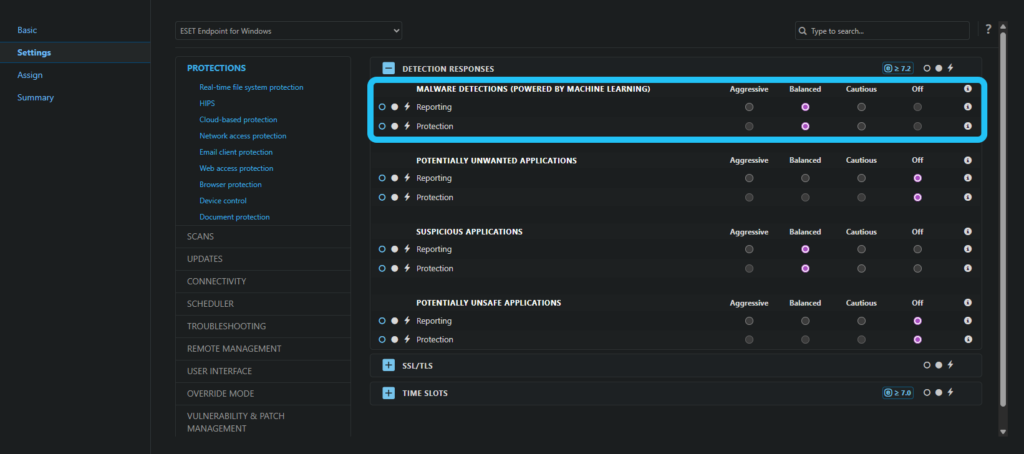
We do not recommend enabling it across the board without proper preparation. Aggressive mode is worth considering once your console has been cleaned up, you understand the environment and you can distinguish legitimate activity from genuine threats. Only then does it deliver real added value: it can detect threats that might otherwise go unnoticed, while your team retains the capacity to investigate them.
Deploying EDR Is the First Step. Configuring It Properly Is the Second
There is no doubt that ESET’s EDR solution is a genuinely effective security tool straight out of the box. Giving it more attention after deployment, however, can significantly strengthen your security. Regularly eliminating false positives, communicating with the client’s IT team to establish what constitutes legitimate activity in their environment, and continually tuning the system can substantially improve both your operational efficiency and the performance of the EDR tool itself.
“The purpose of EDR is to give analysts a fast and clear overview of what is happening across endpoints. This protects them from unnecessary alert overload and rapid fatigue.” says Stanislav Stančík
As an ESET Platinum Partner, Binary Confidence has extensive experience providing this type of ongoing support. We can handle alert clean-up, rule tuning and other configuration tasks for you, or our specialist can guide you through the process. The result is a console worth monitoring—and a security tool that genuinely protects your organisation.
Do you need help configuring EDR or other ESET products?
Contact us at info@binconf.com

This activity is supported by the European Cybersecurity Competence Centre (ECCC) as part of the project under grant code 101145856, and by the Ministry of Investments, Regional Development and Informatization as part of the state programme of the Recovery and Resilience Plan of the Slovak Republic under project grant code 17I04-04-V02-00001.